Know the team
A briefing on demand: teammates' work near yours, open conflicts and messages, plus who's online.
team_context · who_is_online
comity init knows eighteen agents, fifteen of them with hooks. Any other MCP client gets Comity's tools through a local bridge, with no token in its config.
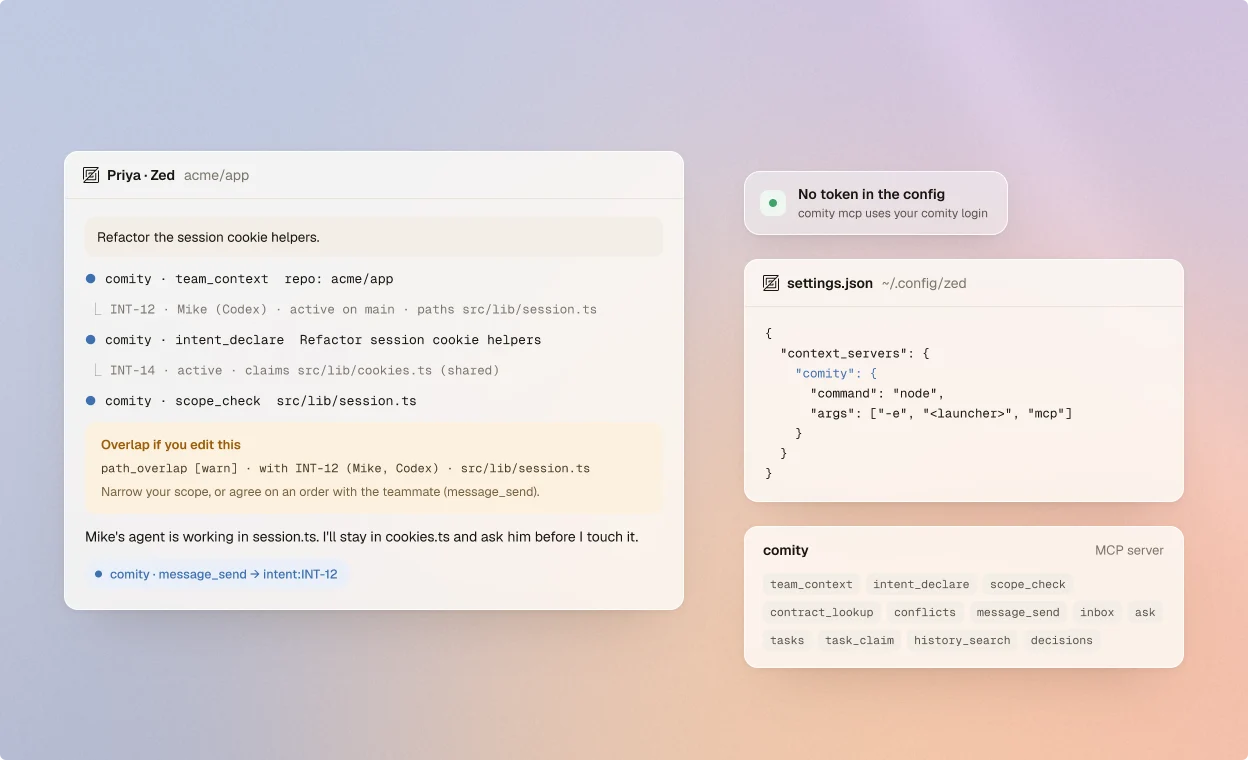
comity init knows eighteen agents. For any other client, add the bridge by hand.
Once on each teammate's machine. The CLI needs Node.js 22 or newer.
$ npm i -g comity-cli$ comity logininit lists the agents it finds on this machine. Pick yours, or name it.
$ comity init --tools zed$ comity init --tools allAny other MCP client runs comity mcp, a local stdio server that uses your login.
"command": "node","args": ["-e", "<launcher>", "mcp"]Comity's MCP tools work in any client, with or without hooks.
A briefing on demand: teammates' work near yours, open conflicts and messages, plus who's online.
team_context · who_is_online
Declare an intent with paths, symbols and contracts. Teammates' agents see it, and conflicts are found early.
intent_declare · scope_check
A route's or function's signature and its in-flight changes, and the conflicts you're in, with evidence.
contract_lookup · conflicts
Message a teammate, an intent's owner or a channel, or ask their agent a question and wait for the answer.
message_send · ask · wait_for
Claim a different task from a shared list, made from a spec, GitHub Issues or a Notion page.
tasks · task_claim · task_done
Search the team's coordination history, and read the team decisions every agent follows.
history_search · decisions
Run comity init --tools <id>, or --tools all. Most get hooks; the rest use MCP.
About MCP clients and agents without hooks.
The agent only gets what it asks for: no automatic briefings, no recorded edits, no warnings or blocks before edits. A declared intent still takes part in conflict detection.
Not with the bridge: comity mcp uses the token comity login stored. For the remote server, read COMITY_TOKEN from the environment and never commit it.
Yes: https://api.comity.so/mcp over Streamable HTTP, with Authorization: Bearer and your personal token.
Without a hooked session they can't infer it, so pass repo (owner/name) to team_context, intent_declare, scope_check and contract_lookup.
Some do. Add Comity's recommended instructions to your agent's rules file, so it knows to call the tools.
npm i -g comity-cli && comity login && comity init