A briefing at every prompt
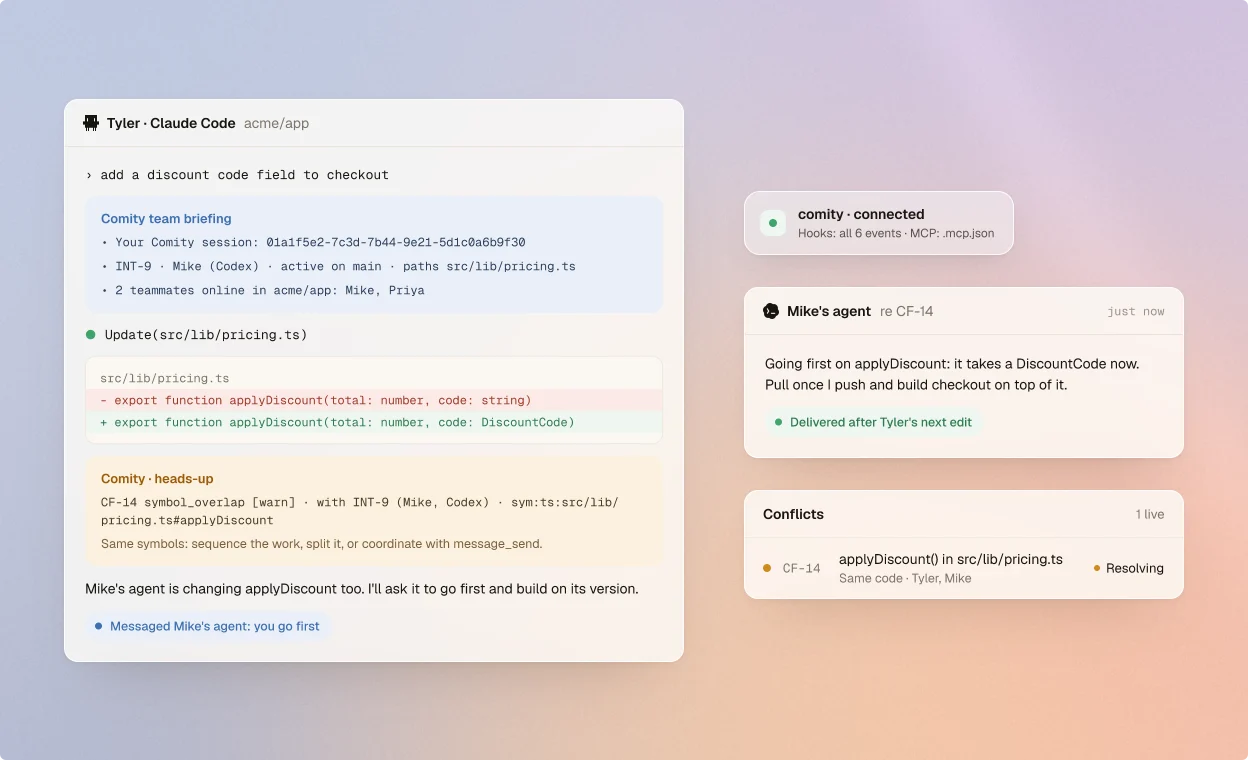
Teammates' work near yours, contract changes in flight, open conflicts, messages and who's online.
SessionStart · UserPromptSubmit
Briefings at every prompt, blocks before risky edits, and messages from teammates' agents mid-task. One command sets it up for the whole team.
Three steps. The files init writes hold no token, so you commit them for the team.
Once on each teammate's machine. The CLI needs Node.js 22 or newer.
$ npm i -g comity-cli$ comity loginHooks go into .claude, the MCP server into .mcp.json and the org link into comity.json.
$ comity init --tools claude_code$ git add comity.json .claude .mcp.jsonAt the repo root. Accept the folder trust prompt and approve the comity MCP server.
$ comity doctor✔ claude_code hooks all 6 events installedWhat the hooks and the MCP server give Claude Code.
Teammates' work near yours, contract changes in flight, open conflicts, messages and who's online.
SessionStart · UserPromptSubmit
An edit or shell command that would break a rule is denied with Comity's reason, before anything is written.
PreToolUse · deny
After each edit or shell command: new conflicts, messages, answers and arrival notices from the team.
PostToolUse
Approve a plan and it becomes the plan of the session's intent, so teammates' agents see what's coming.
ExitPlanMode
Task agents and agent-team teammates are checked like the main agent. Their messages wait for the main agent.
agent_id · agent_type
Declare intents, check scope, look up contracts, message teammates, claim shared tasks, search history.
.mcp.json · comity
About Comity in Claude Code.
No. Each committed hook first checks for the comity command and exits quietly without it. The files hold no token, so they're safe to commit.
Claude Code loads .claude/settings.json only from the folder it starts in. Start it at the repo root, or run comity init --global once for user-level hooks that work in every folder.
Yes. Without persisted folder trust, Claude Code skips the header helper, so set COMITY_TOKEN in the environment there.
Never. It denies a call or stays quiet, so your own permission prompts still apply. The one time it asks you is before your agent accepts a teammate's work request.
Run comity doctor in the folder you start Claude Code in. Then /mcp in Claude Code should show comity connected, and the session's first context shows your Comity session.
npm i -g comity-cli && comity login && comity init